Showing posts with label ms outlook. Show all posts

Thursday, June 22, 2023

Buggish: Outlook 2023 Disable Automatic Image Download

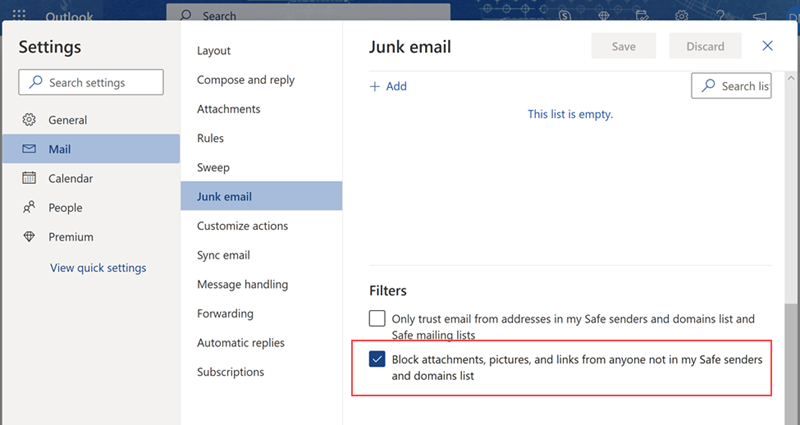
Outlook > Settings > Mail > Junk email > Block attachments, pictures, and links from anyone not in my Safe senders and domain list


Feedback

I went through almost all the options. I did not look into Junk email because why would it be in Junk email? Block? Pictures? I searched for download or image ...............

It was also so difficult to find a page because all the sites were for the old outlook where the first step was to find the "File tab".... WHERE IS THE FILE TAB!!?!?! Answer is that there is no file tab in 2023. I don't know when it disappeared. I don't know when this option was disabled.

I would like this option even for anyone in my Safe list. Yes, I want this for all received emails even from myself. I want to manually download the image each and every time.

Reference

https://answers.microsoft.com/en-us/outlook_com/forum/all/how-to-stop-images-from-automatically-download-in/9b4b080b-0fba-4c6c-bfc2-3799cb386a50

Thursday, March 26, 2015

Buggish: Microsoft Outlook - Replying to Meetings

I just cannot tolerate it after so many years and Outlook versions... why do they not include reply button as an option when you open an Outlook meeting? It has the forward and forward as iCalendar. Yes, you could just CTRL+R or Right-Click > Reply but some people just cannot understand how to do that (those people exist or they just enjoy messing with my brain). That or they conveniently forget every time I explain those options after I waste 2 minutes (plus being distracted from my work plus venting why they do not either write it down or open the several emails with the same steps).

Or I suppose I could just stop sending meeting minutes that way the boss can stop requesting them from coworkers when I am out. Sorry, that was my 2 minute rant. Back to work!

Saturday, February 21, 2015

Outlook 2013 vs Outlook 2010 (First Impression)

The biggest issue I have with 2013 is that it does not automatically pop-up the replies or forwards. I often have to copy information from one email to another, so not being able to quickly switch from one email to another is quite bothersome without changing the default settings. So, I do not like this new feature unless there was an easy way to tab back to my previously viewed emails.

There seems to be more bugs with 2013 than 2010. 2013 crashes more often, lags more often, and other odd behavior. This occurs even when there is no stress on the system. For example, I would just do a typical email check and Outlook could just crash completely or it hangs for several seconds.

For some reason when I am not on VPN, I cannot view my regular inbox. I have no looked into saving/caching emails onto my local system but why would this default change? I rarely have issues with disk space on the local system. Group mailbox seem slower to refresh when I switch between my mailbox with a group mailbox even if I was just in the other mailbox.

Still unable to assign the organizer to a meeting. This is quite annoying as I still cannot find a way to change this after opening a new meeting. I still have to go to the mailbox before creating a new meeting. Even if it is static or constant for a meeting, couldn't there be at least a query box to ask which mailbox I want to use? I would still like the ability to change the organizer to a meeting because some coworkers can never remember to use the group mailbox. 

2013 seem to be bulkier with no new advantages to my daily use so far. The ribbon style does not bother me as much as other people make it out to be. I actually find it easier to edit emails and files with the new ribbon. People's biggest complaint is that they cannot find the features. Yes, it was kind of annoying but it only takes an extra minute or two. They should learn to scan/read more accurately. But given some of the other work that I've seen them produce, I doubt they will ever really learn. 

Overall, Outlook 2013 is functional and usable. I prefer 2010 primarily because it seemed more stable. I only use the most basic of features like compose email, setup meetings, and group mailbox.

Friday, September 12, 2014

Rant: Why Do I Have Trouble Convincing People to Use Search in Outlook?

Unlike my fellow coworkers, I like to use the search features because it is faster to find specific emails for me. But for some reason, they are forever stuck using folders to categorize their emails.

Of course, this is not much of a problem with our personal emails, emails that go directly to us (for work purposes). These are primarily with group emails. We need folders for internal, for external, for processes, for projects, etc. Depending who is more direct (which is very subjective at times), emails are filtered however the person handling it wants to filter it.

This would not be a problem if Microsoft Outlook actually returns the correct emails with the correct search terms. I just do not understand why Outlook just does not return the correct results when I request it to search in all folders. For some reason if I search for a ticket number, not all the emails are in the result. This is not even missing a folder, some of the emails found are in the same folder as the missing ones. If I go to that specific folder and search for the exact same term, it returns me the emails missing in the other search from a different folder using search all folders.

The reason I am trying to convince everyone to stop using folders and use search terms is because there are times we need to audit a process and see all emails related to the search term. I cannot afford the time to go through each folder to find emails on something.

Their counter argument is that they cannot find the emails that way. I am like... what?! They just have to type in the folder name that they normally use and there it is. I even demoed this in front of them in our conference call on many occasions. This would also force them to use our standards so that we can all find emails related to specific topics.

For example, I have to trace what happened with Ticket#123. Did we get client agreement for the scheduling? Would this be under folder 'external' or folder 'processes' or folder 'scheduling'? To make it more confusing there is all 'processes' in 'external' and 'scheduling'. That is not to be confused with 'internal' and 'external' in 'processes'. I have actually raised this example to my group and their explanation is that they know which one it would be in. Somehow this makes sense because it works for them even though they could not figure out how the other person files their files. Yet, I am expected to know which folders they had filed it under. Yet, searching for 'internal process' will provide the same materials that they are looking for. And if they just want their specific emails, they just have to type in their name or email id.

Folders are so old-school (in my opinion). This folder structuring has always been a problem. I have been trying to convince them that labels, keywords, and searches are much more effective in our line of work because we handle a lot of different teams.

Anyways, this rant has really triggered within me to evaluate me value to the team. I have tried to instill a lot of different ideas from my experience but none has stuck with any of the new members. Although they recognize that I am bringing ideas, most of them (in my opinion) are so stuck with their old processes from their old teams. I know that I have some prejudices towards their generation of corporate engineers, but they just cannot convince me that they care for new ideas at all.

On a side note about ranting, I am starting to notice that I jump around a lot when I'm venting. It gets more difficult to focus on my original complaint as I get more.... 'passionate' about the issue. I wonder if there is a way I can focus the energy more effectively. But on the other hand, I can use being more passionate about certain things even if I have to become less rational then usual.
Wednesday, September 3, 2014

Work: MS Outlook hangs when opening a meeting invite

This suddenly happened to me today when opening a meeting invite today. The odd thing is that it is the only meeting invite that I unable to open. All the other invites are ok.

System Background

MS Outlook 2010 (desktop client, not OWA), Windows 7 Pro

Basic Troubleshooting

Restarted Outlook, restarted computer

Other Odd Behaviors

  • One coworker is having the same problem. Two others have no problems.
  • I was able to find the original invite. I noticed that I received 3 copies. I am able to open the first invite, the other two I am unable to open.
  • A coworker forwarded me the same invite, and I noticed that I received 3 copies just like the original. I do not know why that happens. I do not get it with other invites. Also, I am able to open the first but not the other two.
  • I noticed after a few minutes (about 3-5 minutes) the meeting will eventually load in my preview screen.
  • Appears that the problem is with loading the calendar which has "searching for this meeting..." although this is not a problem with the first email (by first I mean the first received email even though they all have the same times on it).
  • Rebooting machine does not fix the problem.

Exiting Problem

I cannot do anything else with Outlook once I attempt to open the broken invite. I end task the outlook. Reopening will allow me to do other tasks.


Conclusion

No fix yet except to wait 3-5 minutes. It has taken my coworker up to 10 minutes to open.

Thursday, January 9, 2014

Work Life: Sharing PST Files

The corporation only provides 50MB of email space. I reach this quote with only one month's worth of emails. To lighten this load, I had suggested a group mailbox so that we can reduce the amount of emails needed in our personal mailbox. The group mailbox has a slightly higher quote but unfortunately also contains more important emails for audit.

Network Share

I tried to search for solutions to store the emails at some location on the network. But, it appears that any sharing over the network is discouraged. I tried testing this anyways and appears that the file gets locked once someone accesses the PST file.

Unlocking File

I could not find a way to unlock the file. I tried to close the mailbox and then tried to close/reopen Outlook. I keep getting the following error:

"The file [[filename]].pst cannot be opened."
I even tried after the user had logged off. After a period of time, I was able to successfully able to access the file. Most likely there is a timer that unlocks the file if somehow the lock is not released properly (whatever that process is if there is one). So this makes this not appealing as a solution to the group.

My Workaround

Because we are just using this so we can keep records of old trails to certain processes, I decided for the short-term to create a local PST and store all the old emails there. Once completed, copy the PST file to the shared folder. Whoever on the team that needs the archived emails can then copy the PST to their local system and attach it to their Outlook.

The user may choose to keep a permanent local mailbox. The user will still follow the steps to "download" the PST from the network folder then simply copies all the emails to the permanent mailbox. Drop and delete the downloaded PST file.

To update the archive file, download the latest copy then copy all old emails to the archive mailbox, drop the mailbox, and copy mailbox to the network folder.

There are some risks that the PST file may get corrupted. Keep a backup file may be useful.


Reference

http://www.howto-outlook.com/faq/aboutpst.htm
http://www.publicshareware.com/public-share-outlook-description.html


Terms

shared mailbox - some sites use this term in place of group mailbox

Friday, October 4, 2013

Complaint: Outlook 2010 - Adding rules to group mailbox with limited access

I do not have full access to the group mailbox, but I do get to read and compose from the group mailbox. So, why am I not allowed to create a rule to copy emails from the group mailbox to my main inbox? I am allowed to run the rule on specific folders which then would copy, but I cannot get it to automatically trigger when it comes into the group mailbox.

Worst case, I should be allowed to do this from client-side instead of server-side since I still technically have access to the emails and could manually do the function.