Showing posts with label buggish. Show all posts

Tuesday, September 16, 2025

BUGGISH: GitHub Search Result Does Not Show Certain Repositories (Work-around)

My corporation has over 15000 repositories. I have migrated over 800+ repositories with no issue. Suddenly a group of apps did not show up. I migrated more and those showed up.

I do not know if it was because of the timing to some internal issue to GitHub. I spent about an hour figuring out why it does not show. I can access the repositories manually by updating the URL.

I decided to see if I updated the description, if it would check there instead. And suddenly, it came up in the results. Only for that one repo. So, I had to go through each of the missing repos and update the description just to have it appear. I only put part of the project name and I can search the repo name that doesn't include the project name. 

My guess is that saving caused GitHub to "index" the repo again. The repos were migrated last Friday. It has been several days. I don't know the root cause but this seemed to resolve the issue. 

Monday, December 9, 2024

Buggish: MS Teams Unable to Login. We've run into an issue. Oops, something went wrong! (Part 3) With Workaround

As of 2024-12-09, I am still getting this error but after messing around a bit, I think I may have found a workaround.

Workaround

It seems like you cannot login when you get the error. This time I decided to click on the chat. Nothing loads but now the usual profile icon shows and a banner to login also shows. If the banner doesn't show, the profile options should have the option to sign in.

After signing in, some things may load. For me, it loaded three or four of maybe eighty or hundred of chats I should have. The profile icon doesn't show nor does the status.

As with the prior login issue, reloading the application after signing in with the issues will then finally load properly.

At least, I can use the app in the morning now. I am not sure why waiting several hours will also reach the same state.


Possible Alternate Workaround

May be able to skip a step above by trying to sign in before closing the app if the option is available. Also closing the app before calling it a day seems to also bypass the issue.

Now that I am writing this alternate workaround, I think there is a possibility that the issue may be with the login token not expiring properly. To make a guess, it may be that it is reusing the token that expires in 24 hours. The reason I have to wait for it open again is that I am waiting for the 24 hours to expire. Closing the app probably removes that token properly. Signing in also kind of removes the token but the app still may be continuing to load so therefor only loading parts of the configurations. And for some reason, closing the app after getting the error does not remove the token properly.

Wednesday, November 20, 2024

Buggish: MS Teams Unable to Login. We've run into an issue. Oops, something went wrong! (Part 2)

Seems like this issue only occurs in the morning.

Maybe waiting for something to load. If so, then it must be something that takes a long time to load as I am unable to log in for at least a couple hours.

Or maybe something to do with the system going into hibernation.


Update 2024-12-09

Buggish: MS Teams Unable to Login. We've run into an issue. Oops, something went wrong! (Part 3) With Workaround

https://douglastclee.blogspot.com/2024/12/buggish-ms-teams-unable-to-login-weve.html

Monday, November 18, 2024

Buggish: MS Teams Unable to Login. We've run into an issue. Oops, something went wrong! (Part 1)

 I've been getting this error. Reboot and app restart does not fix the issue.

We've run into an issue

Oops, something went wrong 


Sometimes later in the day, it'll work. Sometimes, it does not. I just use the web version.


Why can't Microsoft figure out how to log into their own application on their own operating system?

https://douglastclee.blogspot.com/2024/08/buggish-ms-teams-unable-to-login-device_30.html

https://douglastclee.blogspot.com/2024/08/buggish-ms-teams-unable-to-login-device.html

https://douglastclee.blogspot.com/2024/07/buggish-ms-teams-login-again.html

https://douglastclee.blogspot.com/2024/07/buggish-ms-teams-login-issue.html


Update 2024-12-09

Buggish: MS Teams Unable to Login. We've run into an issue. Oops, something went wrong! (Part 3) With Workaround

https://douglastclee.blogspot.com/2024/12/buggish-ms-teams-unable-to-login-weve.html


Tuesday, September 10, 2024

Buggish: MS Excel (Web Version) Copy/Paste Issue with message "Retrieving data. Wait a few seconds and try to cut or copy again."

Some days, several brain cells just hate Microsoft. Is it MS' fault? Probably just another underpaid and overworked engineer. But still... why something as simple as copy/paste breaks?

I copy cells then I paste and I get:

"Retrieving data. Wait a few seconds and try to cut or copy again."


Copy something else (not in spreadsheet), paste, correct. Copy same cells again, paste, error message. Paste, paste, paste, paste, paste, paste, paste, paste, paste.... all error messages. Wait... paste... error message.


Sheet has 4700+ records, 9 columns of data.


Reduced record count to 4000+ records.


Now suddenly works.


Unrelated

Copy a cell, select into a cell (ie so that cursor appears in the cell), paste. In the Excel app, this will copy the value into the cell (instead of the equation or type).

This will work on the first cell. Select a second cell and suddenly doesn't work. This happens every time.

Somehow selecting into 1 cell won't delete the clipboard but the second one does. Or probably what is happening is when selecting out being inside of a cell deletes the clipboard. Whatever the case, why is moving cells impacting the clipboard at all?

Friday, August 30, 2024

Buggish: MS Teams Unable to Login. Device must comply with your organization's compliance requirements. (Resolved? Two weeks and no issues)

Suddenly, I identified a pattern that was suspiciously correlated to my login issues with Microsoft Teams. I noticed that I was able to connect successfully when I connect to VPN to another network unrelated to the login that I use on Teams. I do not know why but I am able to replicate it by disabling my VPN.

Although I found the cause to my issue, I do not know why it is the cause to my issue. My login is to domain A. My system is on domain B. My VPN is to access B's Azure cloud solutions.

Maybe the compliance part requires access to Azure cloud? Shouldn't that be on the backend though? Any case, it has been two weeks and no issues as long as I wait for the VPN to connect first.

It still sucks that I have to restart Teams whenever my laptop is in sleep mode too long but at least it is not as irritating as the above issue. This is likely the end of this series of MS Teams bugs.


References

Part 3 - https://douglastclee.blogspot.com/2024/08/buggish-ms-teams-unable-to-login-device.html

Part 2 - https://douglastclee.blogspot.com/2024/07/buggish-ms-teams-login-again.html

Part 1 - https://douglastclee.blogspot.com/2024/07/buggish-ms-teams-login-issue.html


Tuesday, August 27, 2024

Buggish: Visual Studio 2022 Stuck in Rebase

I got stuck in Visual Studio 2022 under Git Changes where I only get the options to Skip or Abort.

Short Answer

Got to your .git folder and delete rebase-merge folder then restart Visual Studio. Restart is required as the screen does not update.


RCA

The complicated part is that I was troubleshooting a separate issue where we get ghost files appearing for apparently no reason but related to white-spaces. I have a potential solution but it only impacts the main branch. Everyone's current branches will continue to have this ghost file issue.

One of the biggest problem with the ghost file issue is that you cannot remove it from the staged or unstaged list. When executing the rebase, it will stash the change. The ghost changes will be stashed but will also not go away so the rebase will fail. VS buttons to continue or abort will also fail. In CLI, it is functioning as normal so this is primarily a VS-ish bug. The bug is probably also on git side where the folder is not removed when either the rebase fails or when aborted.

Tuesday, August 20, 2024

Buggish: MS Teams Unable to Login. Device must comply with your organization's compliance requirements. (3rd post on same bug)

I just rebooted after a Windows update that required a reboot and behold... my "Device must comply with your organization's compliance requirements" infinite loop is back. You can see my past issues...

https://douglastclee.blogspot.com/2024/07/buggish-ms-teams-login-again.html

https://douglastclee.blogspot.com/2024/07/buggish-ms-teams-login-issue.html


Besides that I have little add from my other posts.

Rebooting again doesn't help.

Restarting app multiple times doesn't help.

Our IT help support is useless.

So-called online MS certified support or actual MS support just points you to the IT help which I already mentioned are useless.

Signing in again and again doesn't help.

It clearly logs in because each time I attempt I get updates to my chats.

The browser version works.

My personal phone which is definitely not org compliant works.

Only Microsoft knows how to break their own apps while all other non-MS apps on a Microsoft OS seem to work completely fine. Their copy/paste do not work across different apps and messes with the global clipboard. Visual Studio is slow as molasses. It takes up 90% of my hard drive (237 GB). Making me have to deal with our useless IT support and cheap-ass infrastructure team that is so penny-pinching to not get a hard drive big enough for someone to work. I constantly have to delete and uninstall then reinstall when I need it again which all requires admin rights which I have to deal with our IT support (at least this one is our department IT which actually is not useless). Ok, this last one may not be Microsoft fault, but I still blame them for all their bloated apps and complicated licensing. I just want to focus on working not trying to train myself to be IT.

Wednesday, July 24, 2024

Buggish: MS Teams (Login again)

Still randomly having the same issue from last post, https://douglastclee.blogspot.com/2024/07/buggish-ms-teams-login-issue.html.

Today I also found that I can open the app. It'll (as always) take forever to "login", error that login doesn't work, then the error will disappear, my chats will refresh (fully? I have no clue). I sent a single message to respond to a chat. As I check other chats, I notice that I have the login error again. When did it happy? I do not know. Why does it happen? Also don't know. But my message was sent... so.......

Why is this so complicating? At least two years (maybe even four but my memory isn't serving me right now). Or is this a white-paper on barely functional is better than holding new features?


Update

I also just noticed that my status is now offline but I have been message people since I created this post. This is also seen on the other end as a couple people have asked how I am offline but responding.

Tuesday, July 16, 2024

Buggish: MS Web Excel find does not always work

Sometimes on Microsoft Excel (Web), the find feature does not nothing. You type in the search text and click Find All then nothing happens. Put in a different search text and still nothing happens.

Refresh the page and suddenly everything works as expected.

Possibility of issue may be that I keep the page open for a maybe an hour or two. Machine was rebooted in the morning a few hours prior. This is not the first time facing this issue.

Tuesday, July 2, 2024

Buggish: Microsoft Web Outlook Cannot Send Message Error

 To no one's surprise, Microsoft has probably one of the worst user experiences.

Trying to send an email. Takes forever and returns an error that says something like "There was an error, please click here for more details." And the more detail returns:  "This message can't be sent right now. Please try again later."

Great, Microsoft, great.

I eventually figured it out. The issue was that I was tagging a private group. It was a group set up in my outlook with a bunch of people that I send to normally. This is separate from Active Directory because I don't have access and I hate dealing with admin support.

Buggish: MS Teams (Login issue)

I just used MS Teams yesterday with no issues for work. I come back today and now I get an error "We weren't able to connect. Sign in and we'll try again." on MS Edge. On most days, refreshing if web or reloading if Windows app will resolve this issue... but today it is not letting me in. Usually one or two attempts will bypass this.

It is not the same error with the Windows app version where I get that my corporate device is not compliant with corporate compliance. Go figure... it was working yesterday and nothing has been installed. And like the web, usually reloading will resolve this in 1-3 attempts... but today a no go.

And now I get a "We've run into an issue. Oops, something went wrong! Restart" error. Seems to be flipping between this error and the one above today.

On top of all that, MS Teams works almost perfectly on Google Chrome. It is again quite amusing to see that I also get the "... weren't able to connect..." error on Chrome but I can just continue to message and receive messages.

After 30 minutes of just refreshing the page, Teams on Edge started working. Also I did in that time was messaging people on Google Chrome, repeatedly refreshing Edge and repeatedly restarting the Windows app.

Monday, April 29, 2024

Buggish: Microsoft Office365 Excel (Web) Copy/Paste is so aggravating

I completely dislike how Microsoft implemented its copy/paste feature on the web. It completely ruins how copy/paste for EVERYTHING else even its own operating system. I just want to simply copy/paste a data from one cell to something else. Anything except a directly copy/paste from cell to cell is always questionable on why it works or doesn't work (even cell to cell is questionable in my mind but seems to at least work most of the time).

Why?!?! It is the most tested and used feature.

I just want to a text inside of one cell to a text inside another cell... same sheet, same row. Simple? Of course, Microsoft does not want it to be! Worst is to cut it because the original data is GONE so what am I supposed to go back to if the paste doesn't work? Obviously, I have to undo but that also messes with the clipboard. How stressful it is just to copy/paste!

What could possibly be wrong? I HAVE ABSOLUTELY NOT IDEA! I just do it again and it will sometimes work and sometimes not. I just keep repeating until it works. No seeable changes to the steps. I even tested with other applications and they all copy/paste fine. So is it memory? Doesn't seem like it. I tried with the same browser and even the same tab. Is it the browser? Doesn't seem like it too. But for stupid's sake, I even rebooted and perform the same task first with no other applications open yet... and yet, not always!

WHY?!?!

While on this topic... why does inserting or delete a wrong clear my clipboard? Why does double-clicking into a cell SOMETIMES clear the clipboard? SOMETIMES? Why is it even SOMETIMES? I rather have the row insert where it is always cleared.

Oh is it just a temporary clipboard for web Excel? Nope, even if you do not copy/paste or copy from Excel (ie you had copied something from another browser, app, or even the app version of Excel)... it is completely gone.

Also, sometimes it'll appear to copy (where the border changes when you normally copy) then when you paste, it says the data is not available. Why does that happy? No clue. How to workaround? Repeat until it works. Sometimes it takes 10s of times until it works. I can even copy/paste in the middle with other apps and it will work perfectly fine. I can copy another row to change the border cell, go back to copy, and it still won't work. I can wait minutes, hours... and it will won't paste even though the message says to give it time. Perhaps Microsoft is a black hole and time works differently there because copy/paste works perfectly fine before, during, and after this issue. Seems to ONLY be the web version of Excel. It is also funny that there are more issues with pasting from web version to app version of Excel than everything else combined.

I think this is very border-line "Not recommending to others" deal-breaker. Especially if you have the manual task of copy/pasting menial tasks.

Even worse... I've been having this issue for over a year now. I even posted this here, Buggish: Microsoft Web Excel Copy/Paste (https://douglastclee.blogspot.com/2023/09/buggish-microsoft-web-excel-copypaste.html).

Wednesday, September 6, 2023

Buggish: Microsoft Web Excel Copy/Paste

 I totally hate Microsoft's copy/paste feature on its Excel web application. It does not comply with the traditional copy/paste feature.

Certain actions like clicking into a cell will clear the clipboard. Worse yet, some actions appear random. For example, I want to move a part of a text from one cell to another. I double-click, select the text I want, cut, and I see the text disappear. I then double-click in the cell I want to paste, and nothing pastes. Try pasting elsewhere like notepad, nothing... zippo.... nada.... zilch. Undo, and try again... and still the same result.

Because I am insane, I try a third time... and behold... it now pastes. What gives?!

This is definitely not the first time. I believe I have an older post complaining about this copy/paste. It is annoying enough that I may keep posting about it.


Updates

Friday, August 18, 2023

Buggish: Tesla Account Locked, Then Locked Out of Car

I regret purchasing a Tesla.

Account Lock Out, Now I cannot Drive My Car

So, I am trying to lookup my insurance info and try to log in. I sign in, I get to the 2 factor-authentication where it sends a code to my phone. AND IT NEVER COMES! 

Whatever the case... I tried to reset my password to maybe reset the 2FA. WORST MISTAKE! This signs me out of my app and now I cannot use my car at all.


Monday, July 24, 2023

Buggish: Microsoft Web Excel keeps clearing out clip board

 Any activity with a cell in the version of Microsoft excel keeps clearing the clipboard. I do a lot of cross-referencing with it and I constantly have to re-copy data.

Any activities like create insert new line, clicking inside a cell, escaping select cell(s), pretty much anything that has to do with a cell will force me to copy from origin again.

This is the global clipboard meaning even if the copied data is not for excel, it is cleared out.

This is quite annoying. This has been going on for a very, very long time. The straw that broke the camel's back was that the cell errored for some reason and I still lost my data.

Not life critical... but extremely frustrating to work around.

Thursday, June 22, 2023

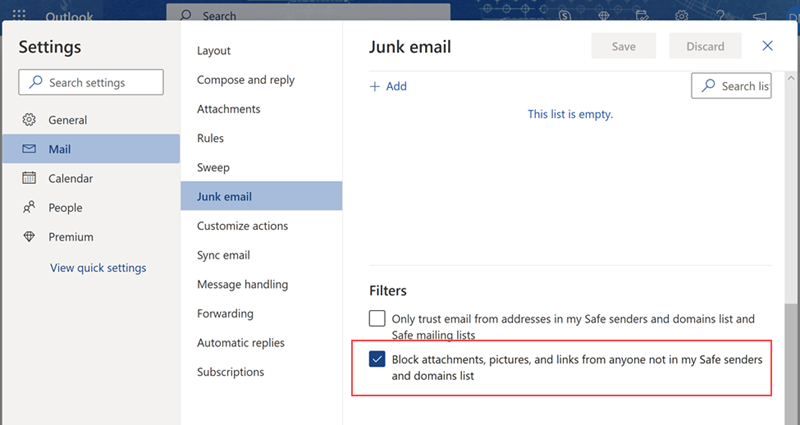
Buggish: Outlook 2023 Disable Automatic Image Download

Outlook > Settings > Mail > Junk email > Block attachments, pictures, and links from anyone not in my Safe senders and domain list


Feedback

I went through almost all the options. I did not look into Junk email because why would it be in Junk email? Block? Pictures? I searched for download or image ...............

It was also so difficult to find a page because all the sites were for the old outlook where the first step was to find the "File tab".... WHERE IS THE FILE TAB!!?!?! Answer is that there is no file tab in 2023. I don't know when it disappeared. I don't know when this option was disabled.

I would like this option even for anyone in my Safe list. Yes, I want this for all received emails even from myself. I want to manually download the image each and every time.

Reference

https://answers.microsoft.com/en-us/outlook_com/forum/all/how-to-stop-images-from-automatically-download-in/9b4b080b-0fba-4c6c-bfc2-3799cb386a50

Monday, April 24, 2023

Buggish: Citrix with Microsoft Authenticator Not Logging In (Kind Of) With Chrome

Using Google Chrome to log into my Citrix to access corporate resources. I have to access the Citrix login which triggers my Microsoft Authenticator. This is too short of a time if I do not unlock my phone first. For some reason, Citrix times out around 30 seconds. It takes my phone a few seconds to reach my Microsoft Authenticator, then a couple seconds to open, then accept the authentication. Then a couple more seconds for the pin request to come up. Then a few more seconds for the keyboard to come up. This is usually the limit of the Citrix time out. I always miss this if I have to unlock my phone first.

Friday, April 14, 2023

Buggish: MS VS does not display git branch names with slash properly (I was wrong-ish)

EDITED (2023-04-24): As I watched demos for other features, I noticed that people used the slash to organize their branches. So, it seems this was intentional. Below is the original post.

Original Post

Microsoft Visual Studio 2022 does not display git branch names with forward slash properly although it is allowed in git and GitHub. Does it do the same with backslash? I do not know and do not wish to test this.

Basically VS will display it with a folder name then a branch in the folder with a name with the rest of the branch name text. For example if the branch name is abc/def, then there will be a folder called abc and a branch in their named def. In GitHub, you will see branch abc/def. Thus this is a bug in Visual Studio.

You cannot delete the folder, but if you delete the branch ('def' from the example above), this will delete both the folder and the branch. Which makes this a visual bug only. Functionally, looks like everything else will work properly.

OR... maybe this is a feature where you can group branches but only in Visual Studio?

Monday, February 13, 2023

Buggish: MtGA RNG Land Pulls (Droughts, Floods)

The random number generator or whatever algorithm MtGA is too unrealistic. Also the opponent decks that you play against is definitely some sort of algorithm dependent on the deck you play.

RNG

Majority of the time, I play a 20-land 60-card aggro deck. In the latest expansion, ONE, this has been much less successful. The reason I still play it is because I lose quickly and win quickly. My other decks are also performing worse across the board.

With 20 of the 60 cards being land, I expect to draw about 1 land and 2 non-land cards. Overall, I may average out to that. But the amount of droughts or floods is unbelievable.

Droughts

Majority of the time, I start with one or two lands and more on the two-land side. When I start with 1 land, I draw a land about a third of the time as expected. This odd is totally not worth it because I have lost every game where I do not draw a land within two draws.

Majority of the games are with two lands. And there have been several games where I reach rounds 7-8 rounds with no more land. This means that I have my initial 7 cards plus another 7 cards. With 14-15 cards, I have only 2 lands where I expect to be around 5 lands.

I have been able to win a minority of the games with two lands due it being an aggro deck. The other decks with more lands never wins with two lands.

The odds of this happening should be around 6%. At 45 games a day, I should expect this about 2-3 times a day. I see this about a third of my games.

Floods

And the other half of the time, I just get round after round after round of lands. The funny part is that this also tends to happen when I draw an initial 3 lands which should DECREASE the odds of pulling another land due to there being more non-land cards remaining.

In the last game which triggered this post, I reached round 6 with 6 lands plus two more in my hand then drew another land. I have gone through 13 cards and have 7 lands. That is over 50% land. And this happens quite frequently in a single day. The odds that this should happen should be way below 1%.

At 45 games a day, I should see this maybe once a week. I see this about a third of my games.

Opponents

I do not understand this part but it ALWAYS seem like my opponents are able to drop a land every, single round. The frequency of my opponents not drawing more than 3 lands in the first 3 rounds is extremely low. I have maybe 2-3 quitters, which if I assume are due to lack of land, per day. I play over 30+ games per day, probably more like 45+ games. I have played with nearly half land decks, and I still cannot pull that kind of stats.

Also with how quickly the game can find me an opponent is extremely good. I suspect several of my games are not human players or at least not normal players. By that, I mean that some may be hired players. Although the game says they'll have special highlight in the player name, I have never met one.

One that almost seems definitely rigged is the blue counter-decks if you play a red-deck. The game-play is almost always identical: two considers, an impulse, and 2-3 negates. Djinn never on round 3; always on round 4 or later. The one mana is always for Slip out the Back if you have a burn card or some sort of single-blue counter spell. And the rare chance that I manage past round 4, it is followed by not just 1 that already can kill me but 2 or 3 Tolarian Terrors.

Then when you are tired of losing to that deck which I face multiple times a day, I play a white or black deck. And BEHOLD, I never see a blue-counter deck.

I do not even have to note it, but there is definitely a set of opponents when I play certain decks. I have played so much that I notice it almost immediately when I switch decks. It is not just color, it is the content of the deck. Even between my red burn deck and my red aggro deck, there is a definitely a pre-set type of decks it plays against.

In the latest expansion, the red aggro has been seeing a lot of black annoying decks where it seems EVERY SINGLE OPPONENT has not just one but 3 Cut Downs.


Cards

Which leads me to the odds of getting a three of a kind with a smaller deck is 4.83% in the initial draw. I do not know how many times I have seen 3-4 of the same cards. 

Cut Down, Consider, Phoenix Chick, etc.

But for myself, I saw 3 Phoenix Chick for the first time since I built the deck a few months ago.


#MagicTheGatheringArena